You’ve probably heard that bigger is better when it comes to batch size in machine learning. But if you try to shove a massive batch into a single GPU, your memory explodes before the first epoch finishes. So what do you do? You cheat. Or rather, you use a clever trick called gradient accumulation. This technique lets you simulate large batches on small hardware, but it’s not magic-it’s math and memory management. Understanding how these three concepts-batch size, gradient accumulation, and throughput-interact is the difference between a training run that takes days and one that takes weeks.
The Effective Batch Size Formula
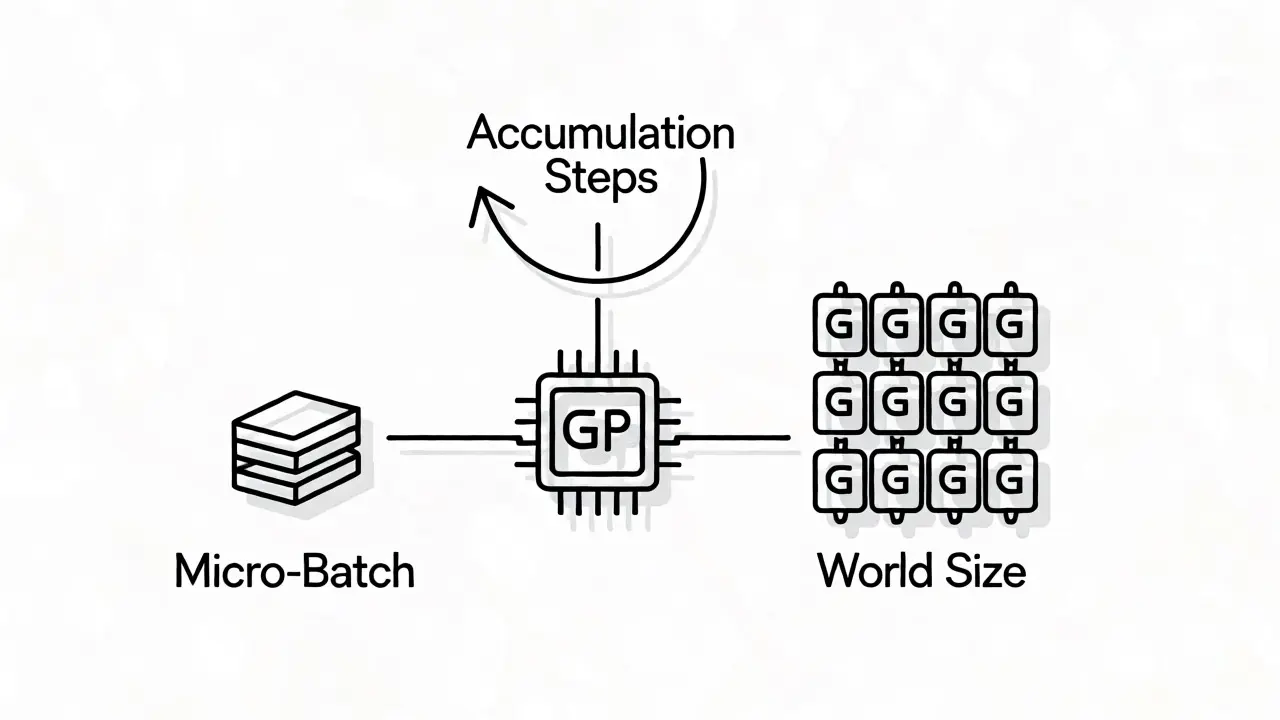
Let’s clear up the confusion around "batch size" immediately. In modern Large Language Model (LLM) training, there isn’t just one number. There’s the micro-batch, the accumulation steps, and the world size. The formula for the effective batch size-the number of tokens actually influencing an optimizer update-is simple: Effective Batch Size = Micro-Batch Size × Gradient Accumulation Steps × World Size.
World size refers to the number of GPUs or data-parallel workers. If you have 8 GPUs, your world size is 8. The micro-batch size is how many examples each GPU processes at once. And gradient accumulation steps are how many times you loop through the micro-batch before updating weights.
Why does this matter? Because most consumer and even enterprise GPUs can’t handle huge micro-batches for large models due to memory constraints. If you want an effective batch size of 128 for stable convergence but your GPU only fits 4 samples per pass, you need 32 accumulation steps across 1 GPU, or fewer steps across more GPUs. Travis Addair, a prominent engineer in distributed systems, suggests aiming for an effective batch size between 16 and 128 for fine-tuning tasks. Anything lower might be too noisy; anything higher often wastes compute without improving quality.
How Gradient Accumulation Saves Your Memory
Without gradient accumulation, you’d need enough VRAM to hold the gradients for the entire effective batch simultaneously. With accumulation, you process a tiny slice, calculate its gradients, store them in a buffer, and then move to the next slice. Only after processing all accumulation steps do you average those stored gradients and perform a single optimizer step.
This is critical because storing activations for a full large batch is expensive. By breaking it down, you keep the peak memory usage tied to the micro-batch, not the effective batch. Frameworks like DeepSpeed excel here by optimizing how these gradients are communicated. Instead of syncing with other GPUs after every micro-batch-which kills speed-they sync once at the end of the accumulation sequence.
However, there’s a catch. Recent academic research from late 2025 argues that gradient accumulation isn’t always the best choice, especially on single devices. It adds overhead because you still have to store those intermediate gradients. On multi-device setups, though, it reduces network traffic significantly, making it indispensable for clusters.
Throughput: The Metric That Pays the Bills
If batch size affects model quality, throughput affects your wallet. Throughput is measured in tokens per second. High throughput means you’re utilizing your GPU efficiently. Low throughput means you’re burning cash while the GPU sits idle waiting for data.
Hardware alignment matters more than you think. NVIDIA’s H100 Tensor Cores work in 16×16 matrix tiles. If your batch size is 127, you leave some of that tile empty. Bump it to 128, and utilization jumps from roughly 61% to 94%. That’s a massive efficiency gain for a single integer change.
| Batch Size | GPU Utilization | Throughput Impact |
|---|---|---|
| 127 | ~61% | Lower efficiency due to padding |
| 128 | ~94% | Optimal tensor core usage |
One case study showed that tuning batch sizes to align with hardware capabilities improved throughput by 2.6x and cut costs per million tokens from $0.73 to $0.28. That’s not just engineering pride; that’s real money saved.
Finding Your Sweet Spot: A Practical Tuning Guide
So, how do you pick the right numbers? Don’t guess. Measure. Here’s a reliable method used by practitioners:
- Start Small: Set your micro-batch size to 1. Run a few steps and measure tokens per second.
- Doubling Strategy: Double the micro-batch size (1 → 2 → 4 → 8). Stop when throughput stops increasing or you hit an Out-of-Memory (OOM) error.
- Calculate Accumulation: Once you find the max safe micro-batch size, divide your target effective batch size by this number to get your accumulation steps.
- Check Convergence: If training loss is unstable, increase the effective batch size by adding more accumulation steps or GPUs, not necessarily by forcing larger micro-batches that cause OOMs.
Giles Thomas, who trained a local model on an 8xA100 cluster, found that curve-fitting validation metrics suggested an optimal batch size near 97. He chose 96 because it aligned well with hardware limits. Empirical testing beats theoretical assumptions every time.
Framework Specifics: DeepSpeed vs. Megatron-LM
Your framework dictates how you configure these parameters. In Megatron-LM, things get tricky with pipeline parallelism. Often, you must set gradient_accumulation_steps to 1 because the pipeline itself handles the batching logic via micro-batches across stages.
In contrast, Axolotl and standard Hugging Face Accelerate workflows treat gradient accumulation as a straightforward multiplier. They allow you to explicitly define how many mini-batches to accumulate. If you’re using Axolotl, remember that diverse samples during accumulation don’t drastically alter learning dynamics, so focus purely on memory and throughput optimization.
For large-scale pretraining, DeepSpeed offers advanced optimizers like LAMB that help stabilize training when you push effective batch sizes very high. If you’re fine-tuning, simpler SGD-based methods with careful accumulation usually suffice.
Common Pitfalls and Fixes
Even experienced engineers trip over these issues:
- CUDA OOM Errors: Usually happen when micro-batch size is too high for the model’s activation memory. Fix: Reduce micro-batch size and increase accumulation steps.
- Slow Convergence: If your effective batch size is too large, you might be taking too few optimizer steps relative to the data seen. Fix: Lower the effective batch size or adjust the learning rate accordingly.
- Network Bottlenecks: In multi-GPU setups, frequent gradient synchronization slows everything down. Fix: Increase gradient accumulation steps to reduce the frequency of all-reduce operations.
Always monitor GPU utilization. If it’s low (<50%), you’re likely memory-bound or waiting on I/O. If it’s high (>90%) but throughput is low, you might be compute-bound or hitting thermal throttling.
Does gradient accumulation change the final model performance?
Mathematically, it should produce identical results to a true large batch if implemented correctly (averaging gradients). However, numerical precision differences and interaction with certain optimizers can lead to minor variations. In practice, it allows you to achieve the stability benefits of large batches on limited hardware.
What is the ideal effective batch size for LLM fine-tuning?
Most practitioners find success between 16 and 128 samples per optimizer step. Smaller batches can introduce noise, while excessively large batches may waste compute without improving generalization. Always validate on your specific dataset.
Why is my throughput low despite having a high GPU utilization percentage?
High utilization doesn't always mean efficient token processing. You might be spending cycles on inefficient operations, poor memory access patterns, or communication overhead between GPUs. Check if your batch size aligns with hardware tile sizes (e.g., multiples of 16 for H100s).
Can I use gradient accumulation on a single GPU?
Yes, but recent studies suggest it may add overhead without proportional gains compared to simply using a smaller batch size directly. It is most beneficial in multi-GPU environments where it reduces network communication frequency.
How does world size affect batch configuration?
World size (number of GPUs) multiplies your effective batch size. If you double your GPUs, you either double your effective batch size or halve your gradient accumulation steps to maintain the same effective batch size. Choose based on whether you need faster iteration or larger batch stability.
 Artificial Intelligence