

Large language models (LLMs) are getting smarter, but they’re also getting heavier. A single model like LLaMA2-7B can take up tens of gigabytes of memory and still slow down under real-world loads. If you’re trying to run these models on edge devices, mobile phones, or even mid-tier cloud servers, raw power isn’t enough-you need speed. And that’s where combining pruning and quantization changes everything.
Why Pruning and Quantization Work Better Together
Pruning and quantization aren’t new. Pruning cuts out unnecessary weights-like removing dead branches from a tree-while quantization reduces how much memory each weight uses, say from 32-bit floating point down to 8-bit. Used alone, each has limits. Pruning can leave your model sparse but still slow if the hardware doesn’t support sparse math. Quantization can speed things up but often crashes accuracy, especially below 4-bit precision. The breakthrough? They’re not competitors. They’re teammates. When you prune first, you remove the weakest connections. Then, when you quantize, you’re compressing a cleaner, leaner model. The result? Less memory, faster math, and almost no accuracy loss. Take HWPQ, the latest framework from early 2025. It doesn’t do pruning and quantization one after the other. It does them at the same time. That’s key. Most tools still apply them in sequence, which means double the time, double the tuning, and double the risk of losing performance. HWPQ skips the middleman. It calculates which weights to cut and how to shrink them in a single pass.How HWPQ Makes Compression 10x Faster
The biggest roadblock to combining pruning and quantization has always been math. Traditional methods needed to compute something called the Hessian matrix-a giant table of second-order derivatives that scales with the square of your model’s size. For a 7B-parameter model, that’s billions of calculations. It’s like trying to map every road in a country just to find one pothole. HWPQ threw out the Hessian entirely. Instead, it uses a smart weight metric that looks at how much each weight affects the final output. No matrix. No O(n³) complexity. Just O(n)-linear time. That’s why it’s 43x faster than SparseGPT and 12x faster than Wanda at pruning. For quantization, it’s 5x faster than AutoGPTQ and over 20x faster in peak cases. This isn’t theory. On LLaMA2-7B, HWPQ cuts quantization time from hours to minutes. And it doesn’t sacrifice accuracy. In fact, it often outperforms sequential methods because it avoids the error buildup that happens when you prune, then quantize, then fine-tune, then prune again.Structured Sparsity: The Secret to Real Hardware Speed
You can prune all you want, but if your GPU or NPU can’t handle sparse data, you’re wasting time. That’s where 2:4 structured sparsity comes in. Imagine grouping every four weights together. HWPQ removes the two smallest in each group. Not randomly. Not haphazardly. Always two out of four. This pattern is baked into modern NVIDIA Tensor Cores. It means your hardware doesn’t need special kernels or custom drivers. It just works. The result? A 2x boost in inference throughput. Attention layers run 1.5x faster. MLP layers run 1.6x faster. And because the model stays dense enough to use standard matrix ops, you avoid the overhead of sparse libraries that often eat up speed gains. This is why Apple, NVIDIA, and Meta are all shifting toward structured sparsity. Unstructured pruning? Great for research. 2:4 sparsity? Great for production.
Quantization: PTQ vs QAT vs QAD
Not all quantization is equal. Here’s what you actually need to know:- Post-Training Quantization (PTQ): Apply quantization after training. Fast. Easy. But risky. You can lose 5-10% accuracy, especially with INT4 or binary quantization. TensorFlow Lite’s PTQ gives you 2-4x speedup with just 1-2% loss-perfect for quick deployments.
- Quantization-Aware Training (QAT): Train the model while simulating low-precision math. Slower, but accuracy stays near full precision. Best if you have time and data to fine-tune.
- Quantization-Aware Distillation (QAD): The advanced version. You train a small, low-precision student model to mimic a full-precision teacher. It’s like teaching a fast runner to move like a champion, even if they’re not as strong. QAD often beats QAT in accuracy-per-bit.
Real-World Trade-Offs: What Works and What Doesn’t
Let’s cut through the hype. Not every model benefits equally from pruning. Research from Apple shows that pruning beyond 25-30% sparsity starts hurting performance on knowledge-heavy tasks-like answering factual questions or reasoning through multi-step logic. At 50% sparsity, many models fail at retrieval tasks entirely. Quantization, on the other hand, holds up better. Even at 4-bit, well-tuned models retain 90%+ of their original accuracy. That’s why most production systems today go with quantization-first, pruning-second. But here’s the catch: if you only quantize, you’re not using the full potential of modern hardware. If you only prune, you’re stuck with bloated memory bandwidth. Together? You unlock the full stack: less memory, faster math, lower power. HWPQ proves this. On LLaMA2-7B, it achieves 5.97x faster inference overall, with dequantization overhead slashed by over 80%. That’s not just speed-it’s battery life, cost, and scalability.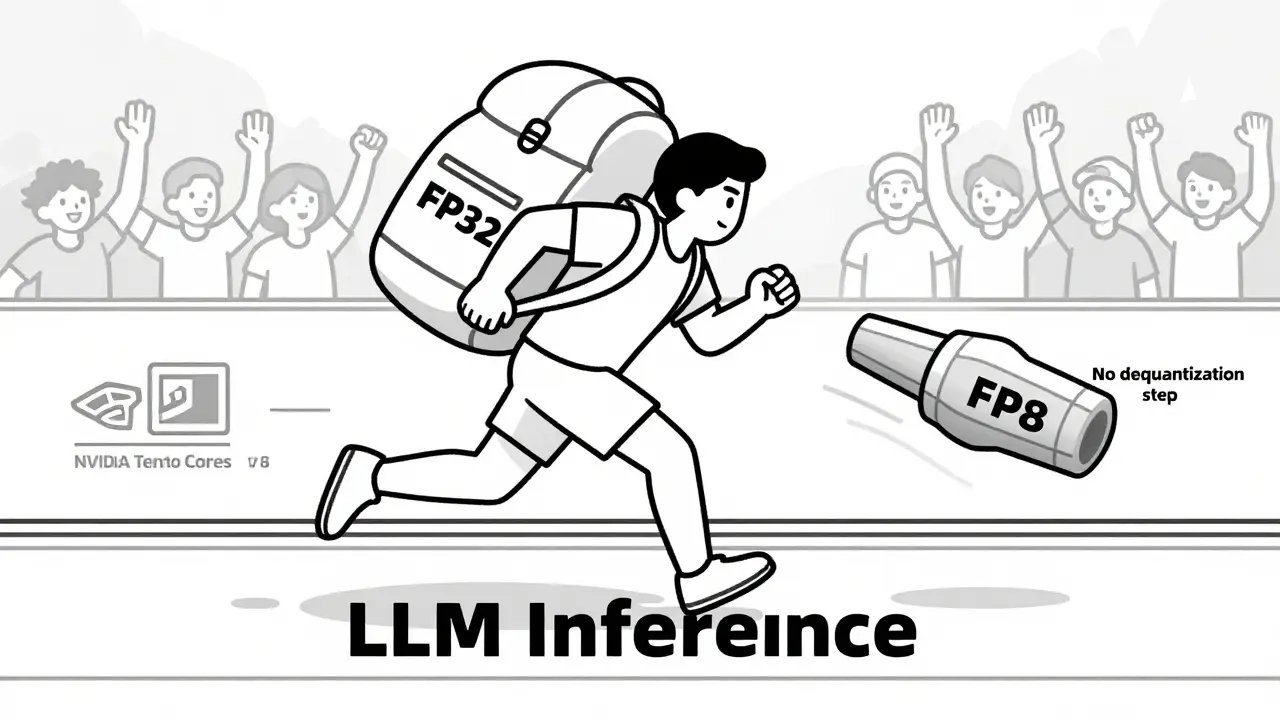
What’s Next? Dequantization-Free Inference
The next frontier isn’t just about shrinking weights. It’s about eliminating the step that undoes the shrink. Most quantized models still need to convert weights back to higher precision during inference-called dequantization. That’s like putting a car in neutral every time you want to accelerate. HWPQ skips it. It runs inference directly in FP8, fully compatible with Tensor Cores. No conversion. No latency. This is why NVIDIA’s Model Optimizer now bundles pruning, quantization, and dequantization-free inference as a single workflow. It’s not a feature. It’s the new baseline.How to Start Today
You don’t need a PhD to apply this. Here’s your practical path:- Start with FP8 quantization using a PTQ tool like AutoGPTQ or HWPQ. Use a small calibration set-100-500 samples are enough.
- Apply 2:4 structured pruning. Don’t go beyond 40% sparsity unless you’re testing on a task that doesn’t rely on fine-grained knowledge.
- Test inference latency on your target hardware. If you’re using an NVIDIA GPU, check if Tensor Cores are active. If not, you’re not getting the full benefit.
- Monitor accuracy with a validation set. If accuracy drops more than 3%, switch to QAD or add 1-2 hours of fine-tuning.
- Deploy. The speed gains are real. The cost savings? Even bigger.
 Artificial Intelligence



poonam upadhyay
March 3, 2026 AT 16:30Shivam Mogha
March 5, 2026 AT 15:16Vishal Gaur
March 5, 2026 AT 21:17Jitendra Singh
March 7, 2026 AT 07:55Madhuri Pujari
March 8, 2026 AT 03:12Sandeepan Gupta
March 9, 2026 AT 16:36Tarun nahata
March 11, 2026 AT 06:17